Stop-loss
A stop-loss defines in advance at which price a position is closed if the trade does not work. It limits the loss and takes the decision out of the moment when emotions are strongest.
Where to place a stop
- Below structure: under the last support or the last higher low.
- By volatility: a multiple of the ATR, for example 2 × ATR below the entry, so normal daily noise does not hit it.
- Not by money alone: a stop chosen only because "I don't want to lose more than $200" ignores the chart. Adjust the position size instead.
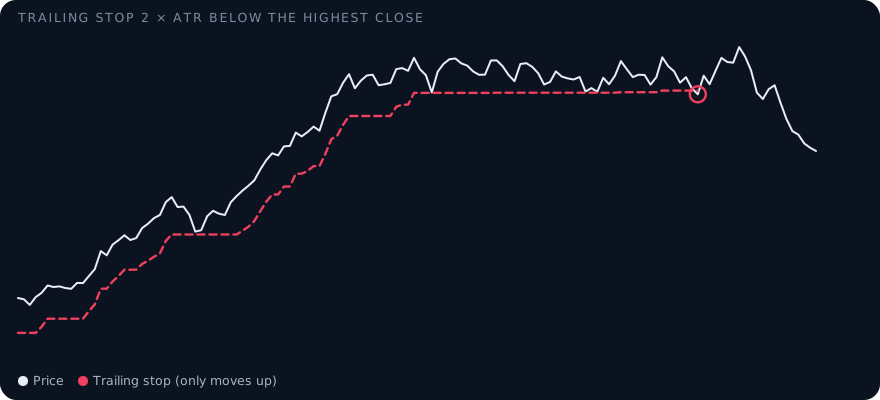
ATR stop and trailing stop
Example: a fictional stock at $50 with an ATR of $1.20. A stop 2 × ATR below the entry sits at $47.60. A trailing stop moves up with the price, for example always 2 × ATR below the highest close, and never moves down. It protects gains in a trend and closes the position when the trend breaks.
Frequently asked questions
How far should a stop-loss be?
Far enough that normal fluctuations do not trigger it, often 1.5 to 3 times the ATR or just beyond a clear support level. The position size then sets how much money that distance risks.
Does a stop-loss guarantee the price?
No. A stop becomes a market order once triggered. After a gap it can be filled well below the stop price.
See it in the screener
The live demo shows every term with example data, right next to the score and its reasons.