Options screener for Mac
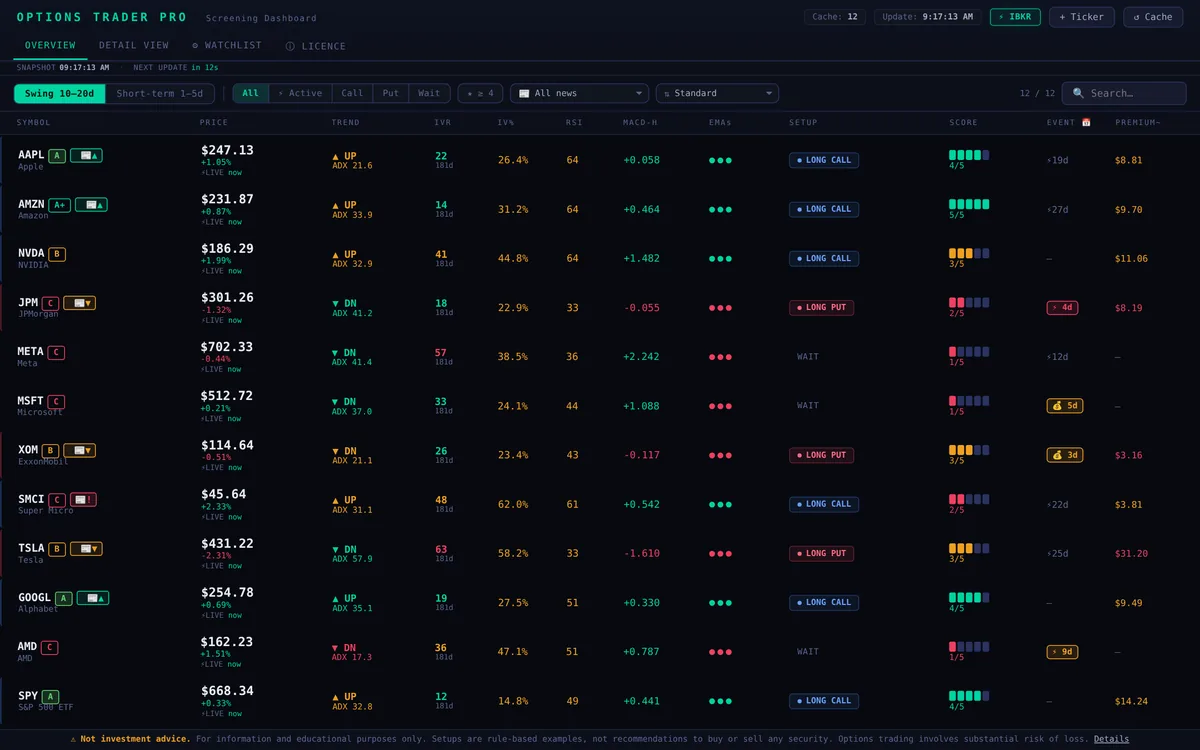
Options Trader Pro checks 120+ US stocks and ETFs by fixed rules and shows one score from 1 to 5 with a rule-based example long call or long put setup: strike, expiry, target and stop, plus the reasons behind every score. It runs as an app on your Mac, not as a website account.
Why a desktop app
- Runs on your computer. Watchlist, settings and the collected IV history stay on your Mac.
- No browser account. The app runs locally, opens the dashboard in your default browser at localhost and sits in the menu bar.
- Optional live data. With Interactive Brokers TWS or IB Gateway running, it uses live prices and option quotes, read only. See options screener for Interactive Brokers.
What the screener shows
- Trend and momentum: EMA 20, 50, 200, MACD, RSI and trend strength via ADX.
- Volatility: IV rank, IV and expected move, so you see whether options are cheap or expensive.
- Dates and news: earnings and ex-dividend inside the holding window, headlines of the last 7 days.
- Example setup: long call, long put or wait, with strike, expiry, estimated premium, target and stop. How it is calculated: methodology.
Install in three steps
- Download the DMG for your Mac: arm64 for Apple Silicon (M1 to M4), x86_64 for Intel.
- Drag the app into Applications and start it. On the first start, confirm once under System Settings, Privacy & Security, Open Anyway.
- Enter your licence key. The dashboard opens in your browser.
System requirements
| Computer | Requirement |
|---|---|
| Mac | Apple Silicon (M1 to M4) or Intel, current macOS |
| Windows | Windows 10 or 11, 64 bit |
| Internet | for market data and the licence check |
| Optional | Interactive Brokers TWS or IB Gateway for live data |
Price
4.99 € for one month, 12.99 € for three months, 19.99 € for six months. The first month is free with code STARTDASH.
Frequently asked questions
Does it run natively on Apple Silicon?
Yes. There is a separate build for Apple Silicon (arm64) and one for Intel Macs (x86_64).
Is there a Windows version?
Yes, with an installer for Windows 10 and 11 and a version without installer as ZIP.
Do I need a broker account?
No. Without Interactive Brokers the screener uses delayed data from Yahoo Finance. With TWS or IB Gateway it adds live prices and option quotes.
Is this investment advice?
No. The score and the example setups are generated by fixed rules for everyone and do not consider your personal situation. They are for information and education.